

A tidy inbox isn’t the same as an organized deal. To learn how to stay organized during a real estate transaction, create one folder for each property, sort documents by transaction stage, use YYYY-MM-DD filenames, and keep deadlines and next steps in one calendar or checklist. Separate executed documents from drafts, then review upcoming tasks regularly.
Contracts, inspection reports, client messages, and closing details can all compete for your attention. A clear system shows what needs action now, makes paperwork easier to find, and helps prevent filing mistakes. This guide covers practical ways to prioritize daily tasks, manage transaction documents, and organize calendars, reminders, and digital files so you can keep each deal moving with confidence.
Key Takeaways
- Prioritize deadlines and next actions, then set aside focused time to review active deals and plan the week ahead.
- Keep contracts, inspection reports, and closing statements in a central, clearly structured location, with signed documents separate from drafts.
- Catch filing errors by using consistent names, promptly scanning paper records, and giving incoming documents a clear next step.
- Use calendar alerts and task tools to track milestones, follow-ups, and client updates without relying on memory alone.
- Choose a folder structure that makes files easy to find by property or transaction stage, and keep it consistent across deals.
1. Daily scheduling and task prioritization
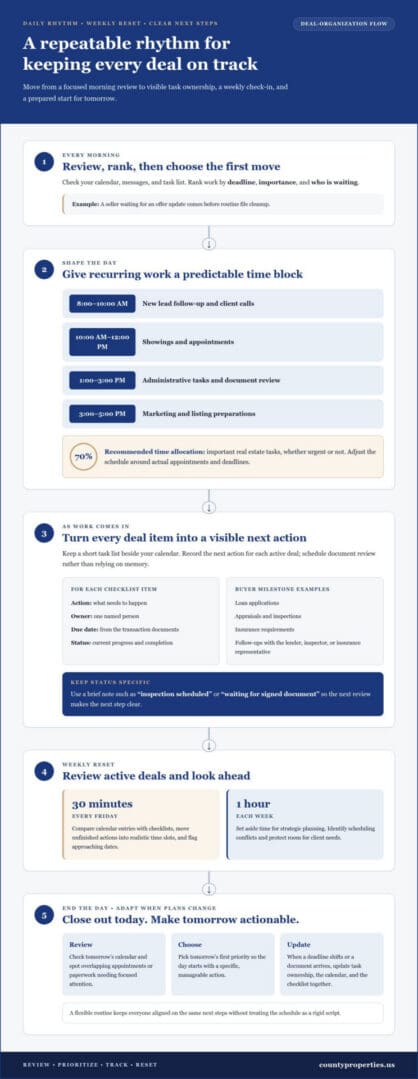
A practical way to stay organized during a real estate transaction is to review your calendar, messages, and task list each morning. Rank tasks by deadline, importance, and who is waiting for your response. For example, a seller awaiting an offer update needs attention before routine file cleanup. This quick review gives the day a clear starting point.
Use time blocks to give recurring work a predictable place in your schedule. One suggested plan sets 8:00-10:00 AM aside for new lead follow-up and client calls, then 10:00-12:00 PM for showings and appointments. Reserve 1:00-3:00 PM for administrative tasks and document review, followed by 3:00-5:00 PM for marketing and listing preparations. Adjust around actual appointments and deadlines.
Protect priority work from constant interruptions. The recommended allocation gives important real estate tasks, urgent or not, 70% of an agent’s time. Keep a short task list beside your calendar, and record the next action for each active deal. If an inspection report arrives during a client call, schedule its review rather than trusting your memory.
Buyers can track loan applications, appraisals, inspections, and insurance requirements in one checklist linked to their transaction calendar. For each item, record the requirement, responsible person, due date shown in the transaction documents, and current status. Add follow-up reminders, then update the checklist after conversations with the lender, inspector, or insurance representative.
A useful transaction checklist follows the deal from accepted offer through closing. Include contract tasks, inspection scheduling, appraisal coordination, document requests, and closing preparations. For every entry, write a clear action, an owner, a due date, and a completion mark. This makes progress visible to buyers, sellers, and the professionals coordinating the transaction.
Transaction coordinators use checklists and track deadlines to help keep tasks on schedule. When several people share a deal, assign each action to one person rather than writing “team.” Add a brief status note, such as “inspection scheduled” or “waiting for signed document,” so the next review makes the next step clear.
Set aside 30 minutes every Friday to review active deals and upcoming deadlines. Compare calendar entries against checklists, move unfinished actions to realistic time slots, and flag approaching dates. Also reserve one hour each week for strategic planning. Use that review to identify scheduling conflicts and protect room for client needs.
If you’re deciding how to stay organized during a real estate transaction, build a daily closeout into your routine. Spend a few minutes reviewing tomorrow’s calendar and choosing its first priority. This check can reveal overlapping appointments or paperwork that needs focused attention. A consistent closeout helps you start the next workday with a specific, manageable action.
Staying organized during a real estate transaction also means adjusting your system when plans change. Review task ownership when a deadline shifts or a new document arrives. Update the calendar and checklist together so everyone sees the same next steps. A flexible routine keeps the schedule useful without treating it as a rigid script.
2. Managing contracts, inspection reports, and closing statements
Store each contract, inspection report, amendment, and closing statement in one central transaction folder. Separate signed documents from drafts, and label each file with the property address, document type, and date. Agents handling 20 or more active transactions can accumulate hundreds of documents, so consistent labels make retrieval faster and reduce filing mix-ups.
Common deadlines include contract response dates, inspection periods, appraisal steps, financing milestones, and closing dates. The purchase agreement and later written amendments set the dates for that transaction. Missing a deadline can affect a contingency or require the parties to agree on a change.
Requirements can vary by state and local area, particularly for disclosure forms, transaction procedures, and recordkeeping rules. Keep the applicable forms and instructions with the property file, and record which version was completed for each sale.
Sellers can organize disclosures, repair records, offers, and closing paperwork in clearly labeled subfolders. Save each offer and counteroffer in sequence, attach receipts or invoices to the related repair record, and keep completed disclosures separate from working drafts. This creates a useful record of decisions from listing through closing.
To coordinate communications with your agent, lender, title company, and attorney, keep a contact list and record the date, decision, owner, and next action after each conversation. Use email or a shared transaction platform for written updates, then save important messages beside the documents they concern. For example, file a title question with the title-related records.
A shared transaction folder should contain the purchase agreement and amendments, disclosures, inspection reports, appraisal documents, lender requests, insurance records, repair paperwork, closing statements, and key correspondence. Set access controls so each participant can reach the records needed for their role, without mixing drafts and executed documents.
A CRM can centralize client details, interaction notes, and follow-up tasks, while transaction management systems track documents, deadlines, and compliance requirements. After a lender call, an agent can record the paperwork requested and assign a follow-up date. This connects the conversation to the transaction checklist instead of leaving important details in an inbox.
Delegation works best when every task has one named owner and a clear completion point. Transaction coordinators can manage agreements, inspection reports, contracts, and closing statements, while agents focus on client decisions and communication. If an agent handles 15 transactions and receives 30 documents per day, manual filing can consume hours weekly; shared procedures help distribute the administrative work.
For a sale that needs coordinated decisions and document follow-through, explore support for your home sale.
3. Common transaction filing mistakes
Inconsistent filenames make important records difficult to locate during a deadline. Replace names like “scan001” with a property, document type, and date. For example, “Oak-Street_Inspection-Report_2026-10-23” identifies its contents at a glance. Using YYYY-MM-DD keeps files in chronological order when sorted alphabetically. Apply the same pattern to contracts, disclosures, repair receipts, and closing statements.
Saving a document under the wrong property creates a different risk. A single residential sale can generate 30 to 50 individual files, so a vague folder called “Current Deals” can become confusing quickly. Confirm the property address before saving, and keep each transaction’s materials together. Avoid folder structures deeper than three to four levels, which can make routine retrieval cumbersome.
Another common mistake is confusing a draft with an executed document. A draft contract and its signed version may look nearly identical, but they serve different purposes. Label working copies “Draft” and signed copies “Executed,” then preserve the signed file without overwriting it. Before sharing paperwork, open the saved version and confirm its date, pages, and signatures.
Paper documents can disappear when scanning is delayed. Scan received paperwork promptly, check that every page is legible, and save it in the correct transaction folder. If a document arrives while you’re handling another task, don’t let it sit buried in an inbox. Set a reminder to file it with a clear description, such as “Save signed inspection response.”
Duplicate files create uncertainty about which record is current. Avoid names like “Final,” “Final2,” and “Final-new.” Instead, include the document type, date, and status, then keep earlier versions identifiable. For example, label a revised disclosure with its new date and mark the prior version “Superseded.” This preserves the sequence without mistaking an older copy for the active document.
Retention mistakes can happen when closed files are deleted too early or kept without a clear process. Record-retention periods vary by state, with a typical range of 3 to 7 years. A baseline in most jurisdictions is 3 years from the date of closing or termination. Guidance recommends keeping transaction files for 5 to 7 years for potential contract disputes or fraud claims.
Test your filing system with a real transaction. Search for the latest signed agreement, then find its related inspection report and closing statement. If an item takes several clicks through unrelated folders to locate, simplify the categories or filename pattern. A consistent end-of-file review can also catch missing pages, misplaced documents, and confusing duplicates before archiving.
4. Digital calendars, project-management apps, and reminders
Give every transaction deadline a home in a digital calendar or transaction management system. Track contingencies, appraisal appointments, document requests, and the closing date as separate entries. For each, add the responsible person, next action, and a reminder. That structure makes the calendar useful for decisions, not merely a record of appointments.
Track deadlines, contingencies, and closing dates in one shared timeline, then compare entries with the signed agreement and later written changes. Set reminders ahead of each due date and assign someone to confirm completion. If an inspection contingency requires a response, the calendar entry should identify the action and who must follow up.
Choose software that supports the process you need rather than adding tools without a clear purpose. A project-management board can group work by property and stage, such as “under contract,” “inspection,” and “closing.” Give each task an owner and status, then use a due-date view to spot overdue paperwork without searching through email threads.
A CRM can centralize client information, track interactions, and schedule follow-ups. Record a buyer’s preferred contact method, the lender’s latest document request, or a seller’s question in the relevant client record. Connect each note to a next action so a conversation about an appraisal doesn’t disappear among unrelated contacts.
After each client conversation, take a few minutes to record the important details. Capture the decision, the person responsible, and any follow-up date in the CRM or transaction system. For example, after a lender requests updated paperwork, note the request and assign the follow-up. This routine keeps the written record aligned with the transaction’s actual progress.
Use reminders and alerts in a CRM, transaction management system, or calendar app to help meet deadlines. Automate repeatable processes, such as creating a task when a transaction reaches a new stage. A system can also monitor deal goals 24/7, but an alert still needs a person to review the update and act.
Keep the digital workflow simple for everyone involved. Use consistent task names, such as “review inspection report,” and avoid vague entries like “handle documents.” Share only the calendar or project board needed for coordination, and update task status after each step. Clear labels help participants understand what changed without needing another message.
Review the dashboard at the start and end of each workday. First, check upcoming reminders and tasks waiting on another party. Before signing off, record completed work and reschedule unfinished actions with a reason. This daily review helps you catch missed updates early and keeps digital tools aligned with the transaction process.
5. Organizing files by property address or transaction stage
A folder system should quickly answer two questions: which property does this file belong to, and where is the transaction now? Use the property address as the main folder, then sort materials into stage-based subfolders. This approach keeps each home’s records together while making current tasks easy to find.
A single residential sale can generate 30 to 50 individual files. Create one main folder per property, then use clear subfolders such as “Offer and Contract,” “Due Diligence,” “Financing,” and “Closing.” For example, an inspection report belongs under the property’s due-diligence folder, while a signed closing statement belongs under closing.
Keep the structure no more than three to four levels deep. A path like “Client / Property / Due Diligence / Inspections” gives you a clear destination without burying the file. Avoid creating folders for every small document type; a separate folder for each email or receipt can make the system harder to scan.
When a client has multiple properties, create a main client folder with a separate property folder for each transaction. Use the full street address in each property folder name, including a unit number where needed. This prevents similar-looking files for different homes from getting mixed up and makes the right records easier to share. Professional real estate and property management firms like citaclerealtors.com apply similar portfolio-level structures to keep paperwork clear across residential sales and managed properties.
Choose categories that match your workflow. A buyer’s folders might include offer, inspection, financing, insurance, and closing. A seller’s structure could include listing materials, offers, disclosures, repairs, and closing. Keep category names consistent across transactions, adapting them only when a deal has a distinct document need.
Cloud storage can make transaction documents accessible across devices and support team collaboration. Choose one platform as the main record location rather than splitting files among personal desktops, email attachments, and shared drives. Set permissions for participants who need access, and avoid circulating multiple copies when one current file will do.
Use a consistent filename inside each folder, such as “2026-10-23_Inspection-Report_123-Main-Street.” The YYYY-MM-DD date format sorts files chronologically, while the document label and address help identify them without opening each one. If a document is revised, include its new date or status instead of overwriting the earlier version.
Test the setup with a simple retrieval check: find the signed agreement, inspection report, and closing statement for one property. If you must search several unrelated folders, adjust the categories before adding more transactions. For a sale involving a cash-offer decision, explore cash-offer facilitation as you organize offer records and property paperwork.
County Properties: Seller Representation
County Properties provides Seller Representation for homeowners preparing to bring a property to market and manage the steps through closing. An organized file system helps keep offers, disclosures, repair records, and transaction documents accessible as decisions arise. With professional guidance, you can clarify the next step, coordinate the sale, and keep communication focused on your priorities.
County Properties also offers Buyer Representation. The team supports clients facing more complex circumstances through Short Sale and Foreclosure Prevention and Senior Real Estate Transition. These services address different real estate needs, so the right starting point depends on whether you’re buying, selling, or managing a significant transition.
If you’re ready to discuss a sale, contact County Properties or visit countyproperties.us.
Make your next move with a clear plan
The most useful organization system is one you can keep using as your plans change. After the transaction, note which habits helped you make decisions and which steps created extra work. That review gives you a practical starting point for your next purchase or sale, instead of rebuilding your process from scratch.
Staying organized during a real estate transaction also means knowing when a professional partner would help. A conversation can help you clarify your goals, understand the steps ahead, and decide what support fits your situation. County Properties works with buyers and sellers through important real estate transitions.
When you’re ready to discuss your next step, connect with County Properties about your move. A thoughtful plan can make the path ahead feel more manageable, and you can take it one decision at a time.
Frequently Asked Questions
What documents should buyers and sellers organize during a real estate transaction?
Buyers should keep the signed purchase agreement and amendments, lender requests, appraisal materials, inspection reports, insurance records, and closing statement. Sellers should organize disclosures, offers and counteroffers, repair estimates and receipts, and closing paperwork. Save related emails or messages with the relevant record, especially when they document a decision or approval. Keep personal copies of completed documents so you can locate key records even if access to a shared folder changes.
What is a real estate transaction checklist and timeline for buyers?
A buyer’s transaction checklist records required actions, responsible people, and due dates from accepted offer through closing. Start with the agreement’s dates, then add lender requests, inspection arrangements, appraisal coordination, insurance steps, and closing preparation. Note dependencies too: an inspection decision may need to follow the report, while a lender request may depend on receiving a particular document. Update the checklist after each completed action.
What tools or apps help manage real estate transaction documents and tasks?
A digital calendar helps surface appointments and due dates; a CRM can organize client information, interactions, and follow-ups. Transaction management software can track documents, deadlines, and compliance tasks, while cloud storage supports access across devices and team collaboration. Choose tools by function, then make one the primary place for each type of information. For instance, store the authoritative document in the shared folder and use the task app to record who must review it.
What are common organizational mistakes that delay closing or create legal risks?
Common problems include saving a draft as the current agreement, filing a document under the wrong property, overlooking a requested signature, and leaving an important message buried in email. These errors can make it harder to identify the active document or respond to a deadline. Before sharing or relying on a file, confirm its property, date, status, and completeness. Limit access to people who need the record, and preserve the final version.